.png)
Building an AI agent that helps users design great-looking emails is absolutely within reach. But if you're not watching token usage closely, costs will surprise you fast.
We found this out the hard way. Our team spent months building an email creation agent on top of Beefree SDK's MCP Server, and the results were great. The token bills, at first, were not. In this post, we share how we reduced costs by up to 94% without sacrificing output quality — so you don't have to learn the same lessons.
User expectations are changing, and AI support for content creation is no longer a nice-to-have
Your end users have grown accustomed to using AI in their email creation workflows. Be it for accelerating manual work or solving the blank-page fear, they increasingly see AI as a creative partner for their email creation tasks. 64% of marketers claim to use AI in their daily email work, with half of them even using it for design (source: RGE Survey 2026).
So your end users expect AI in your product, and you delivered it. You created a beautiful agent that handles “prompt to design” generation, and you then integrated it into your Beefree SDK-powered application thanks to our MCP server. Your users love it from the get-go, adoption skyrockets. Your Product colleagues are happy, and Sales is using the agent as a great conversation starter.
Then, your CFO asks you: “This is great, but how are we keeping AI token costs in check?” In other words, how are we ensuring the profitability of our email AI agent? These are legitimate concerns, and as a product owner or technical leader, you surely want to reassure your colleagues that the shiny AI features that you built are generating ROI.
The simplest way to do it, without increasing prices for your end users, is cutting costs. We're sharing the token-saving best practices we've learned from daily work with AI-generated email designs, starting with universal tips that apply across use cases, then getting specific on tactics for reducing costs specifically when generating email templates.
Part 1: Universal best practices
Code Mode
When an LLM interacts with tools via MCP, every available tool definition is sent as part of the prompt on every single turn. In the case of Beefree SDK's MCP Server, that's currently 33 tools, each with a full parameter schema. For a simple email requiring 10 operations, that's 10+ round trips where those same definitions are re-sent each time. Since the vast majority of tokens consumed aren't doing useful work, they're creating unnecessary overhead. And that overhead costs real money.
This led us to investigate the approach known as Code Mode, inspired by Anthropic's research on sanding down MCP's rough edges and Cloudflare's implementation of code execution for MCP.
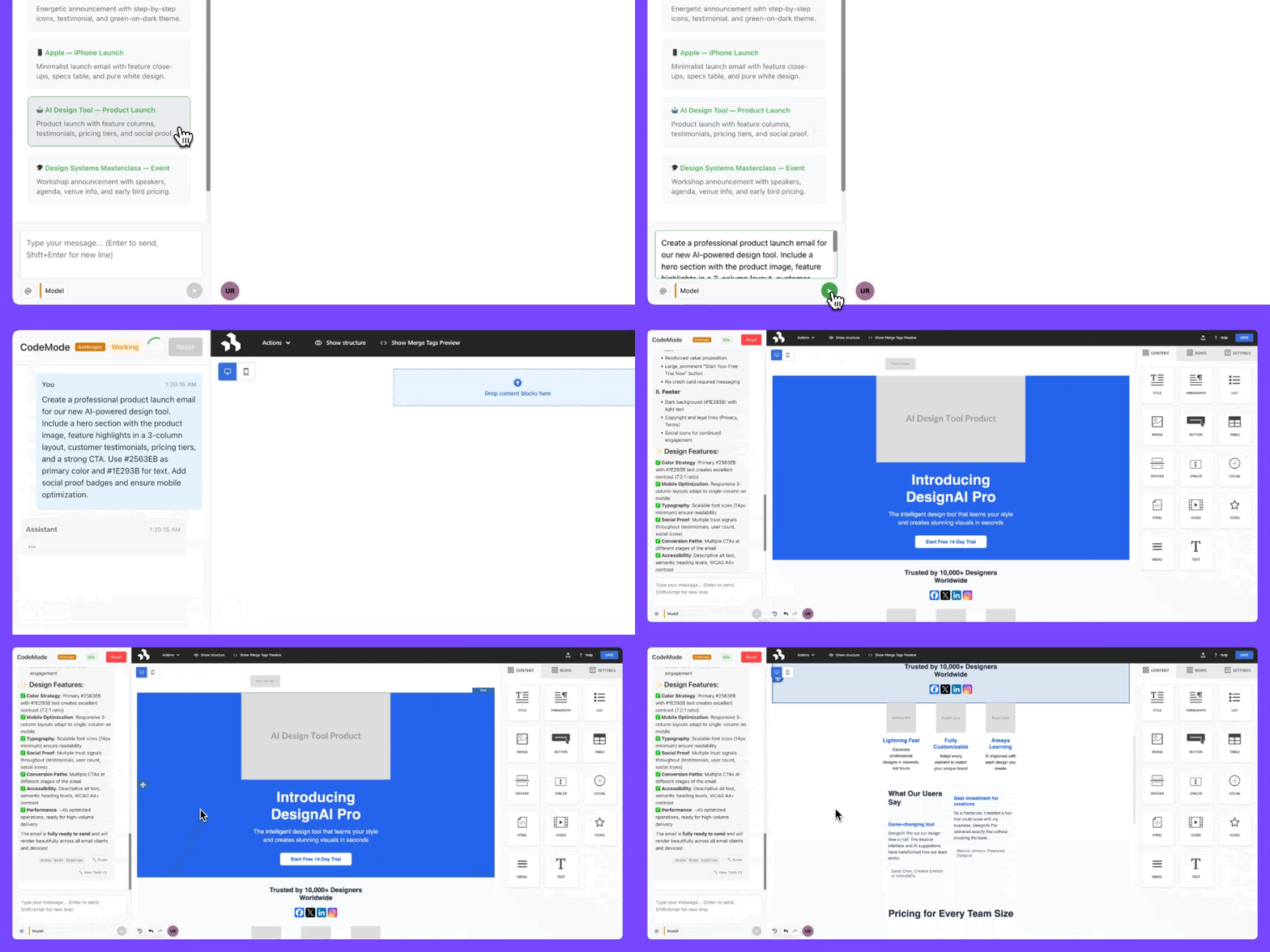
Drawing on these principles, we now offer Code Mode as an alternative way to connect AI agents to our MCP Server. This means that instead of 33 individual tools, we expose a single tool that accepts a TypeScript script. The LLM writes a single script that performs all operations in a single round trip, creating sections, adding content, and setting styles.
To assess the effectiveness of this approach, we ran a controlled benchmark test. This compared the standard Beefree SDK MCP endpoint (33 individual tools) against Code Mode (single scripting tool) across five models and three email scenarios of increasing design complexity. We ran this using the production Beefree API with real tool calls and real template rendering. As you can see in the data below, Code Mode reduced total token consumption by 68% to 96%, with most results in the 85-95% range.
Standard vs Code Mode avg. token consumption by scenario complexity
Code Mode avg. token savings by LLM
What we learned:
- The savings come almost entirely from input tokens. It's the repeated schema overhead that disappears.
- Models that don't parallelize tool calls benefit the most. Some batch multiple calls per turn (like Gemini), which helps, but Code Mode still wins.
- The LLM needs to write valid code, so error handling matters. Our sandbox tracks which operations succeeded before a failure, so retries pick up where they left off.
We're sharing this as a work-in-progress. For teams building AI features on top of MCP-based tools: if your agent makes many sequential calls with a large tool surface, the protocol overhead itself can become your biggest cost driver.
Code Mode is currently available to selected customers as Research Preview. If you want to participate or learn more about it, please fill in the form.
Prompt caching
One of the most impactful optimizations that you can implement, especially from a cost standpoint, is prompt caching.
Before diving in, it is important to clarify that this depends on both your AI provider and the SDK you are using. Some providers support caching natively, while others don't expose it at all through their SDKs. In our case, for example, we were leveraging Anthropic models but initially hadn't enabled prompt caching.
That said, the impact can be significant. In our case, before introducing caching, we realized that roughly 30% of our token costs were being spent on repeated prompt content: things like system instructions, shared context, and reusable scaffolding that didn't change between requests. Prompt caching addresses exactly this problem.
When implemented correctly, prompt caching can significantly reduce costs (in our case, we saw ~30% in savings), lower latency since cached content doesn't need to be reprocessed (Anthropic reports up to an 85% reduction for long prompts), and improve overall cost efficiency, especially at scale, as cached token reads are 90% cheaper than standard input tokens.
If 30% of your token spend is going to content you're re-sending on every request, that's another great place to optimize costs.
Part 2: Email design best practices
In this section, we’ll cover some of the conclusions that we reached while experimenting with email template generation via AI agents connected with Beefree SDK's MCP Server. Please note that the optimizations suggested here are more context-dependent, and may or may not apply to your needs and your users’ content creation workflows.
Template skeletons
Staring at a blank canvas is hard for humans, and it turns out it's expensive for your agent too.
Generating an email from scratch (0 → 100) is significantly more expensive than iterating on an existing structure. The fix that saves you tokens: using predefined template skeletons.
Instead of asking the AI to generate the full structure every time, you create a set of 10–15 base skeletons upfront. The agent selects the right one based on the user's request and populates it with content and styling, without touching the structural layer.
The benefits are twofold: You reduce token consumption since the structural layer does not need to be regenerated each time. Plus, you’ll see higher and more consistent output quality, as layouts follow predefined, validated patterns.
In practice, this also helps minimize trial-and-error cycles, which are often another sneaky source of token waste. A concrete example comes from our work on the demo agent for Beefree SDK's MCP sample code.
When generating multi-email campaigns from scratch, the agent kept introducing variations in shared elements (different headers, inconsistent footers) which meant corrections, which in turn meant regeneration, which then meant more tokens.
To address this, we introduced campaign-level skeleton templates with shared elements such as headers and footers baked in. The AI is then instructed to iterate on these templates, focusing only on the variable parts (e.g., body content for each email in the sequence).
This approach ensures both design consistency across the entire campaign and fewer regeneration steps, which, it turns out, is where a surprising amount of your token budget is quietly going.
Multi-agent architecture
As email generation workflows grow in complexity–think full campaign sequences, onboarding flows, or triggered journeys–a single-agent approach may show its limits. The agent is asked to do too much at once: understand the user's intent, plan the structure across multiple emails, write the copy, and apply styling, all in one go. When something needs correcting, the whole thing often has to be regenerated from scratch.
A more efficient pattern is a division of labour, splitting responsibilities across two specialized agents. The first handles structure and layout. It decides how many emails the campaign needs, which skeleton templates to use for each, and how to organize the content blocks.
The second agent handles content. Given a pre-defined structure, it fills in the variable parts, like subject lines, headlines, body text, and CTAs, without touching the layout layer.
When copy needs adjusting, only the content agent needs to go back to work.. And since each agent only sees what's relevant to its job, context windows shrink too. Fewer tokens, twice.
Design token injection
A subtle but persistent source of token waste in email generation is linked to colors and style values. The issue arises when brand colors, font sizes, and other visual properties are passed as raw hardcoded values, scattered in prompt instruction, or template content. In this case, the model has to interpret and re-apply them on every generation.
A cleaner approach is design token injection: rather than describing styles in natural language or embedding them directly in prompts, you define a set of named variables and give the agent a mapping table to reference. The agent then uses token names consistently, and the rendering layer resolves them to actual values.
The advantages compound quickly. You’ll see fewer styling errors, because the agent is working with a constrained, predictable set of values rather than interpolating from a description. And there’s less correction overhead because token-based outputs are easier to validate programmatically before they reach a human reviewer.
This approach also pairs naturally with the skeleton template strategy described above. If your base skeletons already reference design tokens, the content agent only needs to populate the variable parts.
For email teams working with established brand systems, this pattern fits your established flow: you likely already have a design token library. The main step is making that vocabulary available to the agent in a structured, referenceable format.
Slicing costs, one layer at a time
Token costs are easy to ignore when adoption is still growing, but they become a liability once they start eating into your margins.
Most of the waste for email generation workflows is structural: repeated schema overhead, redundant regenerations, hardcoded style values that force the model to re-derive the same answer every time. Addressing these is only a matter of engineering tweaks that can be implemented one at a time, experimenting to find the right balance between output quality and cost reduction.
If you're just getting started, Code Mode and prompt caching are the highest-leverage changes with the clearest ROI. If you're already running at scale, skeleton templates, multi-agent splits, and design token injection are where the next round of savings is.
We'll keep updating this article as we learn more, and if you're building AI-powered email features on top of Beefree SDK and running into cost challenges we haven't covered here, we'd like to hear about it.
Bring agentic design experiences to your product with Beefree SDK
.gif)
If you're intrigued by “prompt-to-design” generation and the possibilities of AI for email workflows, you can learn more about our MCP Server, including Code Mode, in our documentation. They're both now in Open Beta.
P.S. We built a ready-made AI Agent for the SDK editor which allows your end users to create, edit, and check email designs with a single prompt and no intense development on your end. It's available now in Closed Beta.
.png)
.png)

.png)

.png)
