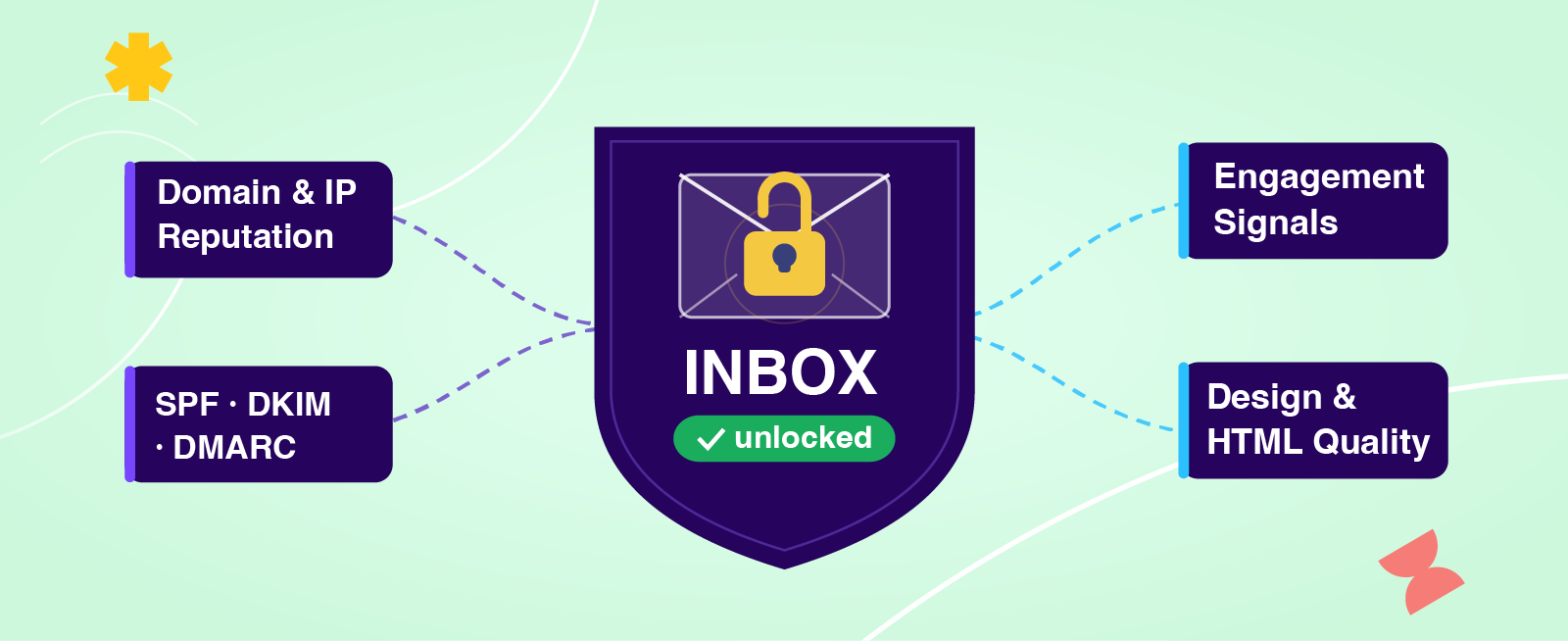
At some point, one of your customers is going to ask why their email landed in spam. Maybe they already have. When they go looking for answers, most of what they'll find is outdated or flat-out wrong — avoid these words, watch your image ratio, check your spam score. The real drivers of inbox placement in 2026 are a shorter list than most guides suggest, and almost none of them live in the design layer. Here's what actually matters, what Beefree SDK influences, and what's on you and your customers to own.
The myth of spam trigger words
For years, the advice was simple: avoid words like "FREE!" or "BUY NOW!" in your subject lines and you'd stay out of spam. It was easy to follow but is now mostly incorrect, at least by today's standards.
Modern spam filters don't work that way anymore. Gmail, Yahoo, and Outlook aren't running a keyword checklist against your subject line. They're using machine learning to evaluate a much broader set of signals: your sending domain's reputation, whether recipients are engaging with your mail, whether your authentication is properly configured, and the overall quality of your list. Content and wording still matter, but they rank near the bottom and mostly only become a factor when reputation is already weak and content looks suspicious on top of it.
This matters for SDK builders because it shifts where you and your customers should be focusing. Obsessing over subject line wording while ignoring authentication setup or list hygiene is solving the wrong problem. The table below shows how the major deliverability factors rank:
What drives deliverability in 2026
With the content myth out of the way, here's what inbox providers are evaluating when they decide where your customers' emails land.
Permission is the foundation
Inbox placement starts with who your customers are sending to and how they ended up on your list. Sending to people who explicitly opted in is the best way to ensure deliverability, and may also be the law depending upon where the recipient is located. Scraped, purchased, or borrowed lists generate spam complaints, and complaints hurt reputation fast. Double opt-in is worth encouraging, especially for customers in regulated industries, because it creates a clear consent record and tends to produce cleaner (aka not spam), more engaged lists from the start.
Authentication tells inbox providers you are who you say you are
SPF, DKIM, and DMARC are also non-negotiable in 2026. If your customers are sending from their own domains, those domains need to be properly authenticated or inbox providers simply won't trust the mail. Making authentication setup clear, documented, and as frictionless as possible for your customers reduces the chance they skip it, leading to deliverability going sideways.
List quality compounds over time
A healthy list isn't something you configure once and forget. Bounced addresses, inactive subscribers, and anyone who's filed a complaint or requested removal need to be deleted or suppressed on an ongoing basis. If you're running a multi-tenant product, one customer with poor list hygiene can create reputation problems that ripple across your entire platform, so keeping a close eye on customers generating high bounce or complaint rates is part of running responsible email infrastructure.
Engagement is the signal inbox providers trust most
Gmail and other major inbox providers are watching how recipients interact with incoming mail. Opens, clicks, replies, and forwards all send positive signals. Deletions without opening and spam reports send negative ones. Encouraging your customers to send relevant, expected email to engaged audiences is directly tied to where their mail lands. Avoid no-reply addresses and encourage replies, because inbox providers factor that in, too (and more replies = improved deliverability).
Consistency and volume matter more than most people realize
Sudden spikes in send volume are a red flag for inbox providers, especially from newer domains or IPs. Customers who are ramping up their sending should do it gradually and stick to a consistent schedule. Erratic sending patterns look suspicious regardless of how clean the list is.
Bulk sender requirements are the new baseline
Google and Yahoo now require senders of 5,000 or more marketing emails per day to meet a specific set of standards: authenticated sending domains, one-click unsubscribe links, and spam complaint rates below 0.3%. Even if your customers aren't hitting that volume yet, building to these standards from the start is the right call.
Setting up Google Postmaster Tools is also worth recommending to your customers, or integrating natively into your product. It's free and gives them direct visibility into their authentication status, spam complaint rates, and compliance with Gmail's bulk sender requirements.
Design's role in deliverability
Design is where Beefree SDK has the most direct influence on deliverability, and it's worth being clear about what that means.
The most common design question we hear is about image-to-text ratio: will sending an image-heavy email trigger spam filters? It depends on who your customers are sending to.
At consumer inbox providers like Gmail, Yahoo, and Outlook, image-to-text ratio is largely a non-issue. Those providers care about engagement signals, not layout ratios, which is why plenty of retail and ecommerce brands send image-heavy emails without any deliverability problems. Where it can still matter is in B2B environments routing through older gateway filters like Proofpoint or Mimecast, though that's becoming less common as more businesses move to Google Workspace and Microsoft 365.
That said, image-to-text balance is still worth getting right, just not for spam reasons. An email that's almost entirely images breaks badly for recipients with images disabled, creates accessibility problems (see how Beefree SDK has invested in creating accessible output!), and tends to perform poorly on slower connections. Frame it as a UX and accessibility standard rather than a spam score concern and you'll give your customers more accurate, useful guidance, while also helping lift their engagement rates, which in turn does help deliverability.
Email file size is worth watching too, and again, this is an engagement issue more than a spam one. Gmail clips emails over 102KB behind a "View entire message" prompt that most recipients won't bother clicking. Emails that get cut short generate worse engagement signals over time. And, the unsubscribe link at the bottom of emails is one thing often clipped, leading to an increase in higher spam complaints if people can’t find where to unsubscribe.
Including a plain-text version of every email is also worth building into your product. Legitimate senders typically send multipart emails with both HTML and plain text versions, and HTML-only emails can be treated with mild suspicion by some filters since it's a pattern more common among bulk spammers. Including a text version of the email also ensures recipients using clients that don't render HTML still get the message, which protects engagement. Beefree SDK customers can power plain-text generation for their users by using the Plain Text API endpoint.
Clean, well-structured HTML reduces rendering issues that can hurt engagement in the same way. Emails that render poorly get closed or deleted immediately, which is a negative signal for inbox providers. The Beefree SDK turns your users’ designs into clean HTML that renders reliably on all email clients and devices. Our Check API takes it a step further by scanning template JSON and flags things like oversized images and file sizes that would trigger Gmail clipping, so your customers can catch and fix problems at the design stage.
A few design practices worth building into your product guidance:
- Encourage a reasonable balance between images and text as an accessibility and UX standard
- Always include a plain-text version alongside your HTML
- Keep email file size under 102KB to avoid Gmail clipping
- Keep unsubscribe links visible and functional, since hidden or broken ones are a fast path to spam complaints
- Avoid deceptive patterns like misleading subject lines, fake reply threading, or disguised unsubscribe links
- Keep sender names and subject lines consistent with what subscribers signed up for
A note on spam testing tools
Spam testing tools like Email on Acid, Litmus, and GlockApps come up a lot in deliverability conversations. Most offer two types of tests: Content scoring, which analyzes your HTML and produces a score; and seed list testing, where the tool provides a panel of inboxes to test against. You're responsible for sending this test through the same email infrastructure that will be used on the final send.
Content scoring has limited value because major inbox providers don't primarily filter on content signals. Seed list testing is more useful, but still doesn't reflect your actual subscriber engagement history, which is what inbox providers weigh most heavily. The most reliable signal available to you or your users is your own sending data.
What Beefree SDK handles vs. what you own
It helps to be explicit about where the lines are, both for your own team and for the customers you're supporting.
Beefree SDK's role is in the design layer. Clean HTML output, accessible and well-structured templates, file size checks, plain-text generation. These are the things we do well and where building with Beefree SDK gives your customers a solid foundation. Good design won't save a sender with a damaged domain reputation, but poor design can quietly erode engagement over time, and that does matter.
Everything outside the design layer is yours and your customers' to own.
As an SDK builder, that means configuring authentication properly for your sending infrastructure, monitoring your platform for customers generating high bounce or complaint rates, enforcing reasonable sending policies (especially on free plans or trials where abuse is more likely), and making authentication setup as clear and frictionless as possible for your customers.
For your customers, it means building and maintaining permission-based lists, honoring opt-out requests promptly, managing list hygiene on an ongoing basis, sending consistently and ramping volume gradually, and monitoring their own complaint rates and compliance status through tools like Google Postmaster Tools.
Beefree SDK can help your customers send better-designed email, but inbox placement is ultimately determined by how they build and manage their audience, and how you manage your platform. No email builder overrides a poor sending reputation.

.png)

.png)
.png)