.png)
Beefree SDK’s MCP Server lets you connect your AI agents to Beefree SDK, enabling you to create truly custom, agentic design experiences for your users. But what exactly could that look like? Let’s check out the AI Co-Pilot that our friends at Really Good Emails created on top of the MCP Server, explore some of their implementation details, and break down the tips you can apply when you’re adding your own email design agents and workflows into your applications.
RGE Studio’s goal: Create an agentic experience that helps users design content faster
If you aren’t familiar with them, our friends at RGE Studio provide a collaborative email creation platform that helps teams create emails and landing pages with ease. The team uses Beefree SDK to power their drag-and-drop editor, and they wanted to help their users create content even faster with the power of AI, while still allowing a seamless transition between AI creation and human editing.
RGE Studio serves a wide range of users. Some are sophisticated email pros running complex email programs, while others have little email marketing experience and are just wrangling content creation alongside other tasks. The agentic design experience the RGE team was envisioning had to work for all of them. So they built AI Co-Pilot, their custom-made email design agent built on top of Beefree SDK’s MCP Server.
Let’s take a look.
Inside RGE Studio’s AI Co-Pilot: Implementation decisions you should steal
RGE Studio’s AI Co-Pilot is a clever AI assistant that helps users create designs from scratch and iterate on existing ones using text prompts.
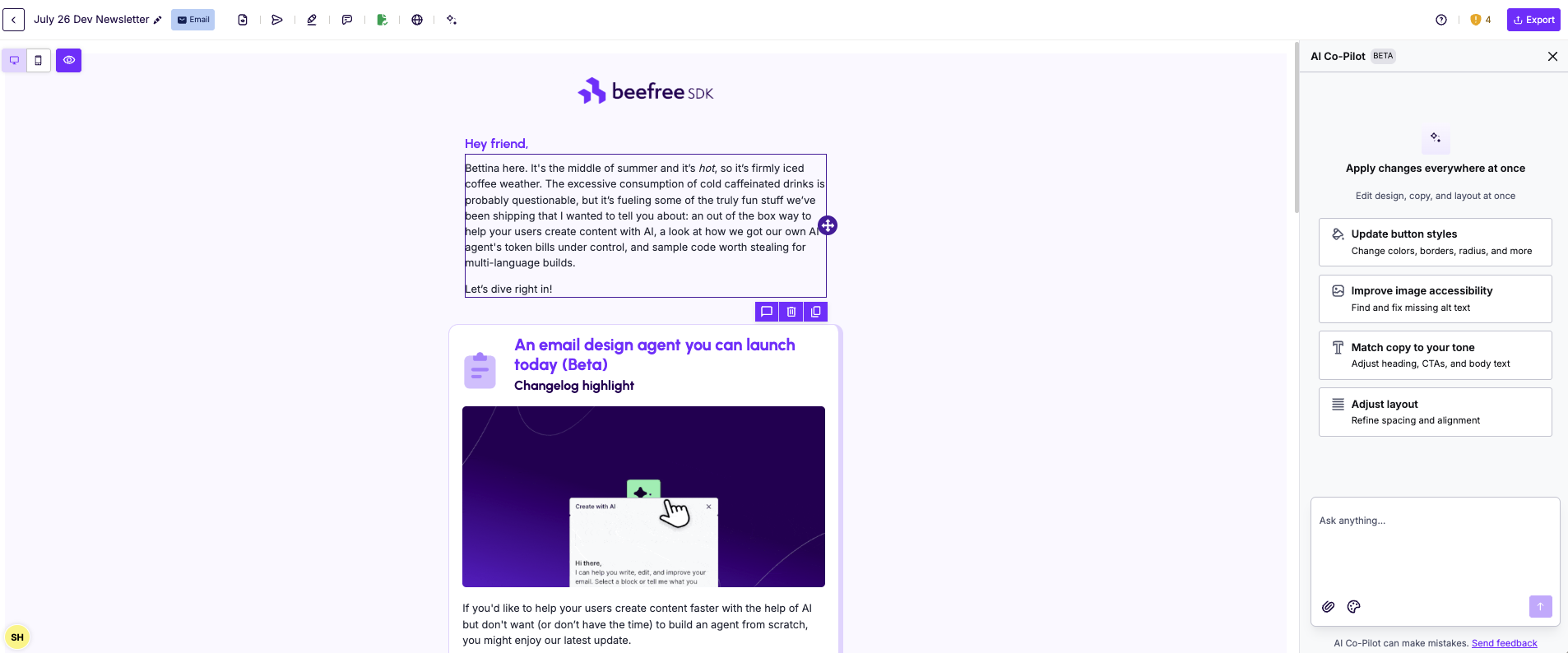
As a company run by email nerds, the RGE Studio team made intentional strategic decisions when building their AI Co-Pilot to reflect the usage patterns and needs of their end users, and some of them you might want to steal when building your own agent.
Meet users wherever they already are in their workflow
RGE Studio’s Co‑Pilot doesn't force one entry point but is flexible enough to support users at any point in their process:
- Start an email from scratch with an AI draft: Great for users who want to start a brand-new design.
- Choose an existing email to "make a copy with AI": Supporting the common use case of duplicating an old campaign as a starting point for a new email. When starting an AI creation workflow from an existing email, they’re pulling the JSON of the design that’s supposed to be used as a starting point, opening up the editor with the original template preloaded, and then have the agent immediately start the process of adjusting the content based on the users’ instructions.
.gif)
- When working with an existing email, users can swap from manual editing to AI mode: This opens the AI assistant in the builder sidebar, where users can start making edits using one of the preset edit suggestions or by putting in their own prompt.
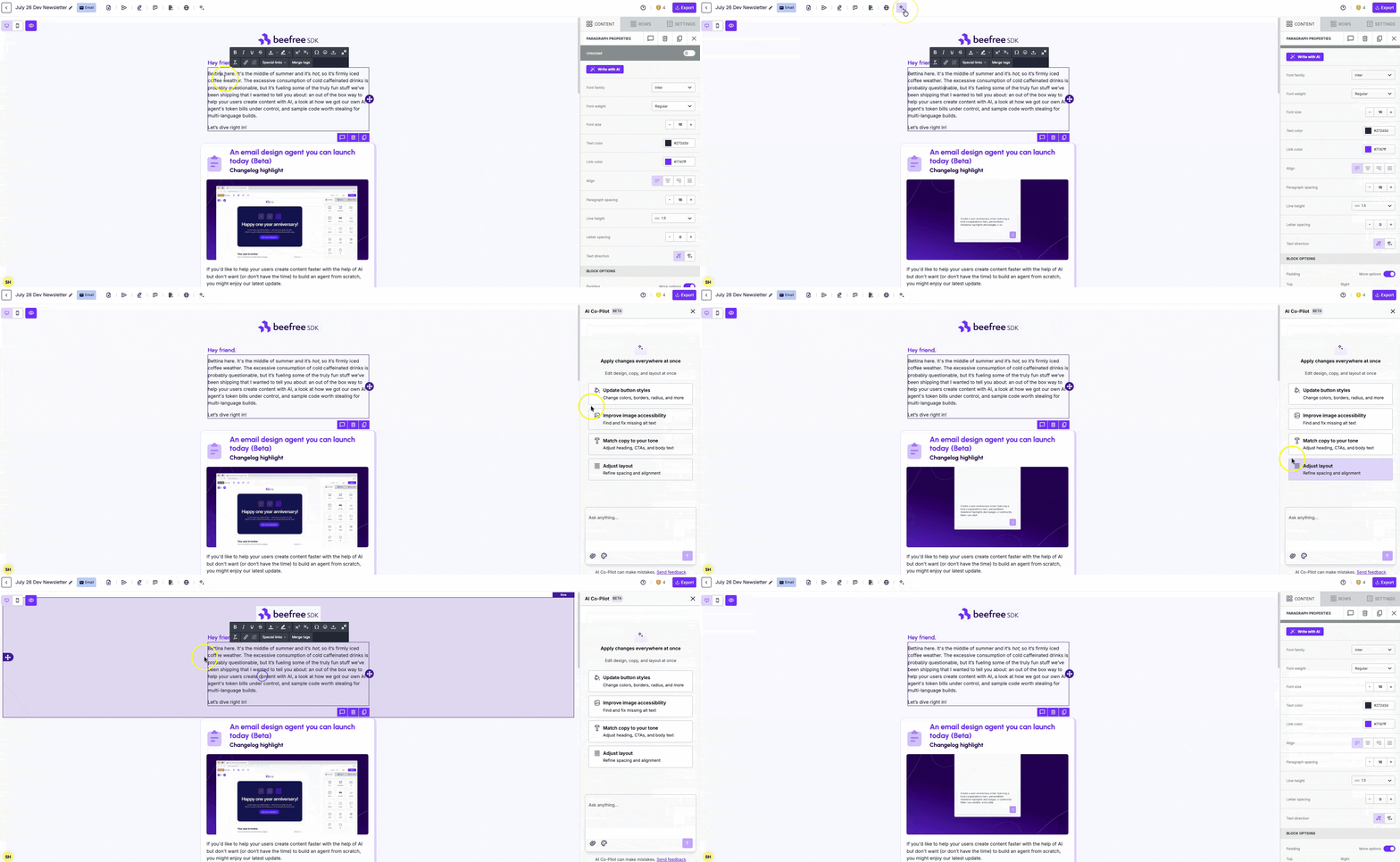
That's the agent supporting three distinct moments in a user's workflow: starting, reusing, and refining. Each is a natural entry point into the agentic experience, good news for discoverability and adoption.
That said, when we say “the agent”, the use of the singular is actually not quite correct. Under the hood, the Co-Pilot is actually run by a multi-agent architecture. Let’s have Efrem, one of the developers behind the Co-Pilot, explain:
“The AI Co-Pilot distributes the work across several specialized agents or steps. The first interprets the user's prompt (together with the initial design, when the user starts from an existing email) and translates it into a plan: which sections the email needs, what each one is for, and what tone it should have. From there, separate steps handle the copy, layout, and styling. Only at the very end, a step we call the executor (this one is code, not an AI agent) assembles the result into JSON format that describes the design and can be loaded into the Beefree SDK editor, where users can then continue to edit it manually.”
Efrem Bonfiglio, Software Developer at Beefree
Provide sample prompts to help your users get started
Blank prompt boxes are intimidating. Most users don't know how to ask an AI for what they want, especially the first time, and then often default to dropping in a short, generic prompt just to see what happens. That can turn into a problem, since even the most clever agent will produce mediocre output if it isn’t prompted the right way.
Giving your users a starting point for effective prompting is one of the most effective ways to ensure they’re having a great first experience with your agentic design flows. The RGE Studio team handled this by providing prepopulated sample prompts (plus a great help doc to support their users in writing effective prompts):
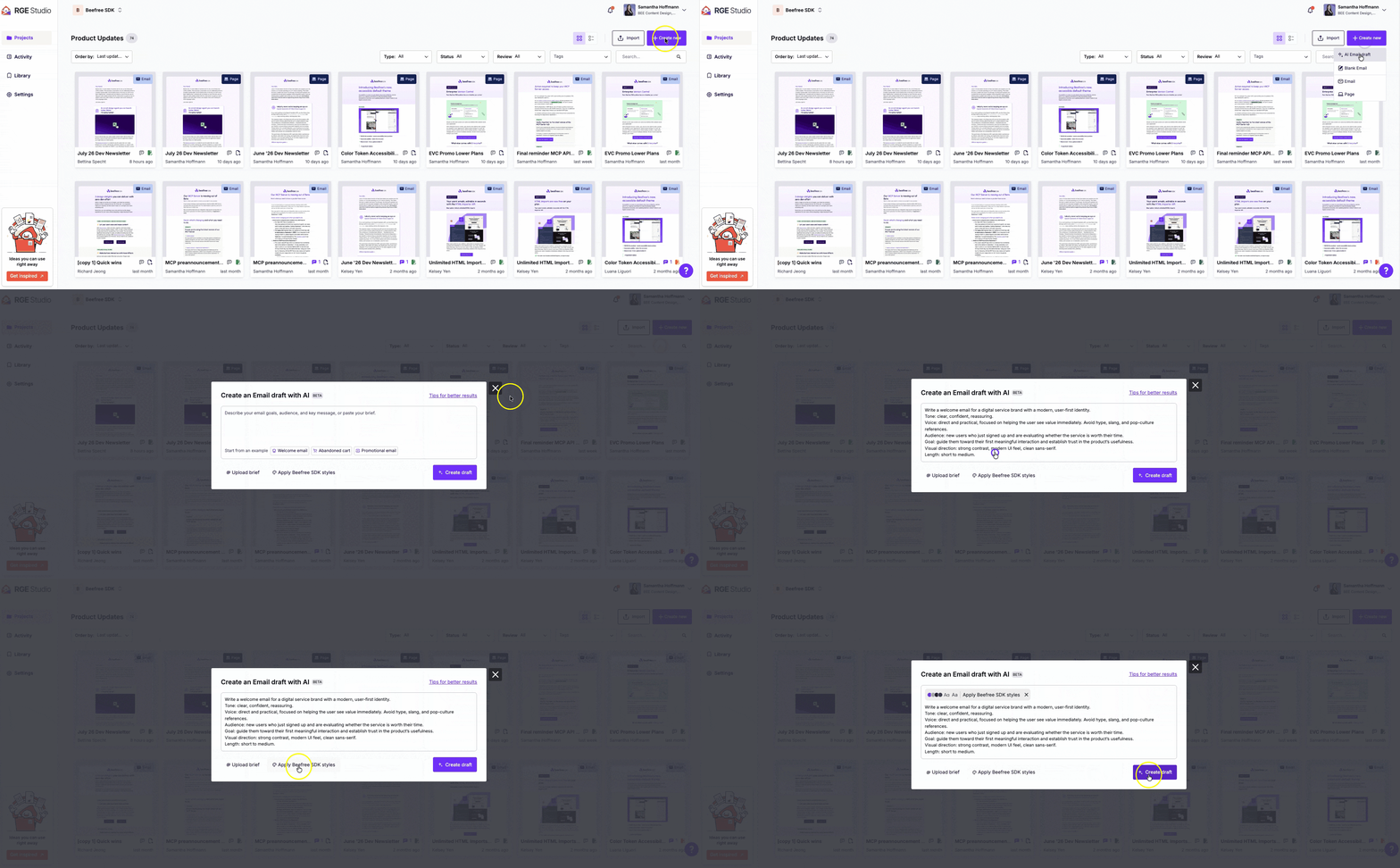
So when you’re building your own email design agent to serve your users, ask yourself the question: What are some of the emails your users create most frequently? Then, codify these popular use cases in sample prompts to make it easy for your users to create their first designs with AI.
Plus, there’s one more prompting trick that the RGE Studio team applied:
“We also improve the prompt server-side. Before the design is planned, a dedicated step expands the user's short prompt into a fuller design brief, so even a rather generic prompt can produce a decent result. Helping your users write better prompts is important, but you can also improve them on your side, too!”
Davide Gaggero, Software Developer at Beefree
Feed brand guidelines into your agentic design experience
In RGE studio, users can define their brand styles (including brand colors, typography, button designs, and more), which are then used as Content Defaults when humans drop new content into the editor.
When users create content with the AI Co-Pilot, they can choose to pass along the brand styles they’ve previously set as additional context to ensure the design output aligns with the user’s brand. Here’s what happens behind the scenes: The agent plans the design layout (sections, buttons, text, colors), and then right before the final design gets assembled, a deterministic check compares the styles set by the agent to the styles set in the Content Defaults, and replaces any styles that don’t match the rules.
For any product manager weighing an agentic feature, the lesson is this: an assistant that ignores your users' existing brand context will always feel like a generic add-on, while one that's brand-aware feels like it was built specifically for them.
Coming soon: Brand guardrails for Beefree SDK’s MCP Server
RGE Studio’s agentic design implementation relies on Content Defaults (and a custom-built, deterministic check) to provide brand-style guidance when creating designs. We’re currently working on implementing brand guardrail functionality directly into our MCP Server, so you can ensure AI-generated designs are always on brand for your users, without building the underlying implementation logic yourself.
If you’re curious to learn more, just reach out. We’d be happy to give you a sneak preview!
Get started building your own agentic design experiences with Beefree SDK’s MCP Server
Ready to build your own agentic design experience? Our documentation provides the details you need to get started, including handy sample code you can use as a starting point to build your own agents.
Plus, if you ever want to create a truly headless AI content creation experience where you have agents create email designs without users having to open the editor, you can absolutely do that as well! Beefree SDK’s MCP Server fully supports headless use cases.
Explore the MCP Server or schedule a call with us to talk about your AI content creation vision.

.png)

.png)
.png)
