64% of the 800+ email pros we surveyed already use AI to create emails, so your users are bringing AI into their workflow whether your product supports it or not. The good news is that if you've embedded Beefree SDK, or you're testing it in a proof of concept right now, you already have the foundation to give them a seamless way to do it inside your product, without building it from scratch.
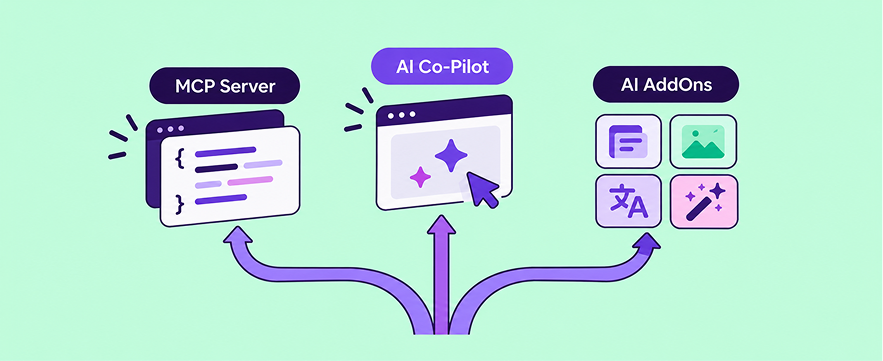
We offer three AI pathways for content building, from custom agentic workflows powered by Beefree SDK's MCP Server to the ready-made AI Co-Pilot to easy-on AI AddOns for copy, images, alt text, and translation. This post helps you find the one that fits where you are today, with room to grow into the next when you're ready.
Which AI pathway fits your team?
Start with the table below and find the row that sounds most like your team. If you're in a proof of concept, now is the perfect time to decide how AI fits into your overall content builder strategy.
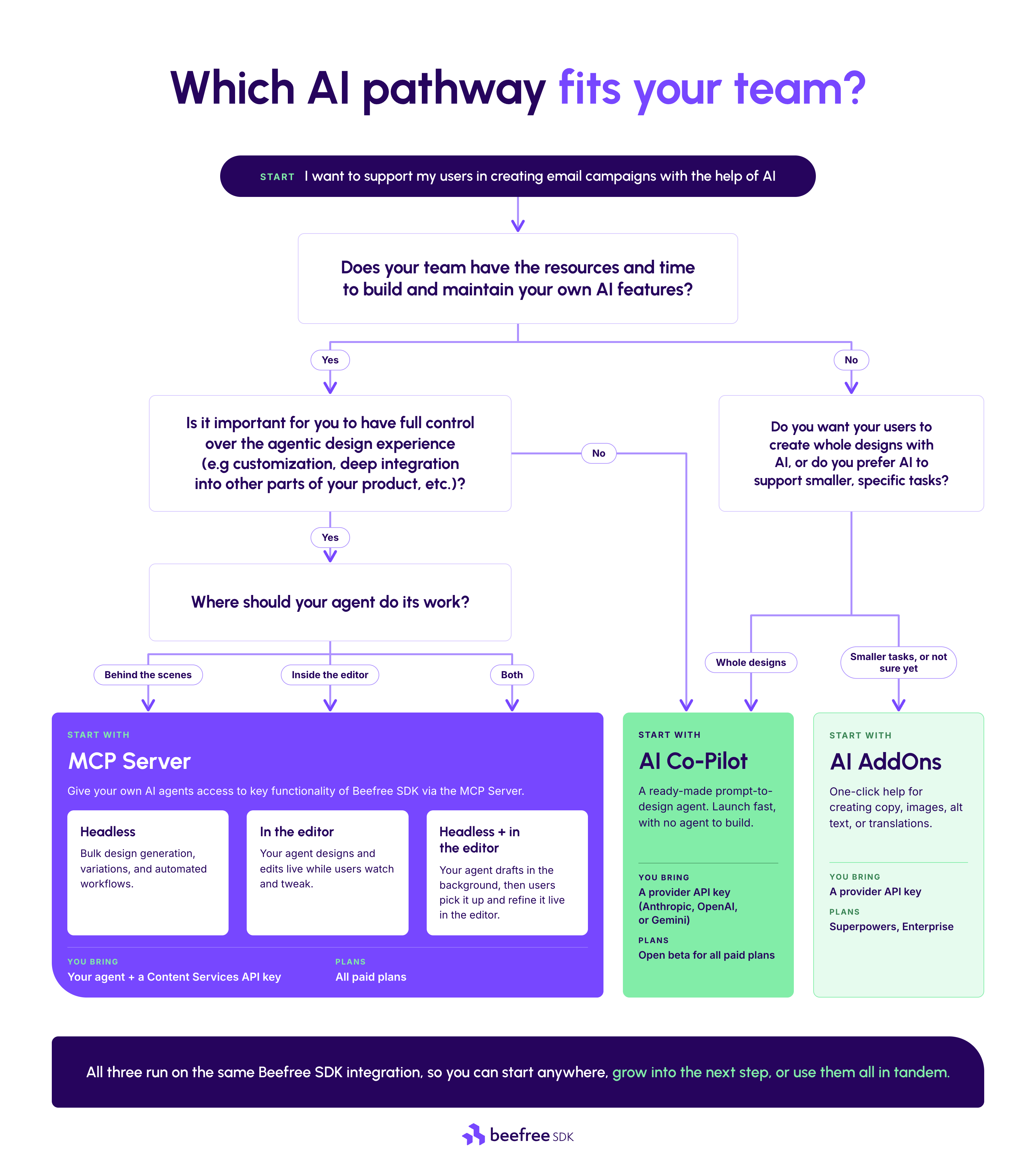
If more than one row or path fits, you're in good company, since plenty of teams run AddOns and Co-Pilot side by side or pair Co-Pilot for their users with their own agent behind the scenes. If you're not sure which plan you're on or what's already enabled, your Developer Console has the answer, and your CSM can walk you through your plan's options.
Build custom agentic workflows on the MCP Server
Your product knows things no generic AI tool does, from your users' audiences and past campaigns to the workflows that make your platform worth paying for. Beefree SDK's MCP Server lets your own agent pair all of that with real design tools, so it can create, edit, and proof emails the way a power user of your product needs.
Your agent can work live in the editor, co-creating with the user, or run headless to generate journeys, variations, and campaigns in bulk, without needing the builder itself open. Whatever agentic workflow you envision, the MCP Server lets you integrate Beefree SDK into it. Here are just a few ways teams are building custom experiences with it:
Automatic generation of multi-step email journeys
CandidateHub connected its recruiting agent to the MCP Server, and it now builds multi-step candidate journeys.
"In a matter of a minute, our agent can create a full journey with beautiful, branded emails that users can adjust and tweak if they'd like." Brad DiPaolo, CandidateHub
Build a custom design agent that lives inside your product
Really Good Emails built its own AI assistant on the MCP Server, and users can create in three ways inside it: start a fresh draft from a text prompt, copy an existing email and let AI adapt it, or switch into AI mode mid-edit, then keep refining by hand whenever they like within the builder itself.
Let your users start a design in Claude (or their AI tool of choice)
Connect your users' favorite AI tools, like Claude, to an agent you've built on the MCP Server, and they can start designing with your product's capabilities right where they already work.
If you'd like to see one (or more) of these in action, watch this clip below.
Keep every AI-generated design on-brand with Brand Rules
Giving an agent real design tools is only half the job, since what it builds also has to look like it came from your users' brand. Brand Rules are guardrails attached to each AI session, and unlike prompt instructions, they actually constrain what the agent can do. You can define:
- Presets: Approved styles for blocks, rows, columns, and overall email settings, so the agent always reaches for the right fonts, colors, and spacing
- Permissions: Which block types the agent can add, update, or delete
- Limits: How many rows, columns, and blocks a design can hold
You set them once in your MCP session configuration, and they apply whether your agent works live in the editor or runs headless. They work with the AI Co-Pilot too, so the same guardrails follow your users across pathways.
Give users prompt-to-design with the AI Co-Pilot
Not every team has the time to build its own agent, and your users' ask is often simpler anyway: "Can I just describe the email I want?" The ready-made AI Co-Pilot gives them exactly that, without your team building an agent itself.
Co-Pilot adds a "Create with AI" panel to the builder your users already know, where they can:
- Create a full email from natural text input
- Edit an existing design, from swapping a color palette to restructuring a layout
- Spin up on-brand variations
- Check a design for quality and accessibility before it goes out
Your users stay the final approver the whole time, so nothing is sent without a human in the loop.
One of the biggest benefits of the Co-Pilot is that you can launch it instantly, without any development effort. Simply enable it in your Developer Console, add your Anthropic, OpenAI, or Gemini key, and you are ready to bring this agentic design experience to your users.
While the Co-Pilot is incredibly fast and easy to deploy, working with our out-of-the-box agent means that you have fewer options for customization. You can adjust the system prompt that to fit your use case and use Brand Rules to make sure every design the agent creates stays on brand, and of course you also have options for adjusting the look and feel of the Co-Pilot panel with Custom CSS. If you want the agent woven deeper into your product (for example by giving it access to past campaigns, audience data, or other product insights) or build a custom UI for interacting with the agent, the MCP Server is the way to go.
The AI-Copilot is in open beta on all paid plans, so you can put it in front of your users now and help shape where it goes next.
Add focused help with easy-on AI AddOns
Think about the moments when your users get stuck today, like staring at a blank paragraph, trying to find the right image, or remembering to add alt text. AI AddOns turn each of those into a single-click fix, and you switch them on in seconds from the Developer Console with no AI development needed and no changes to your integration code:
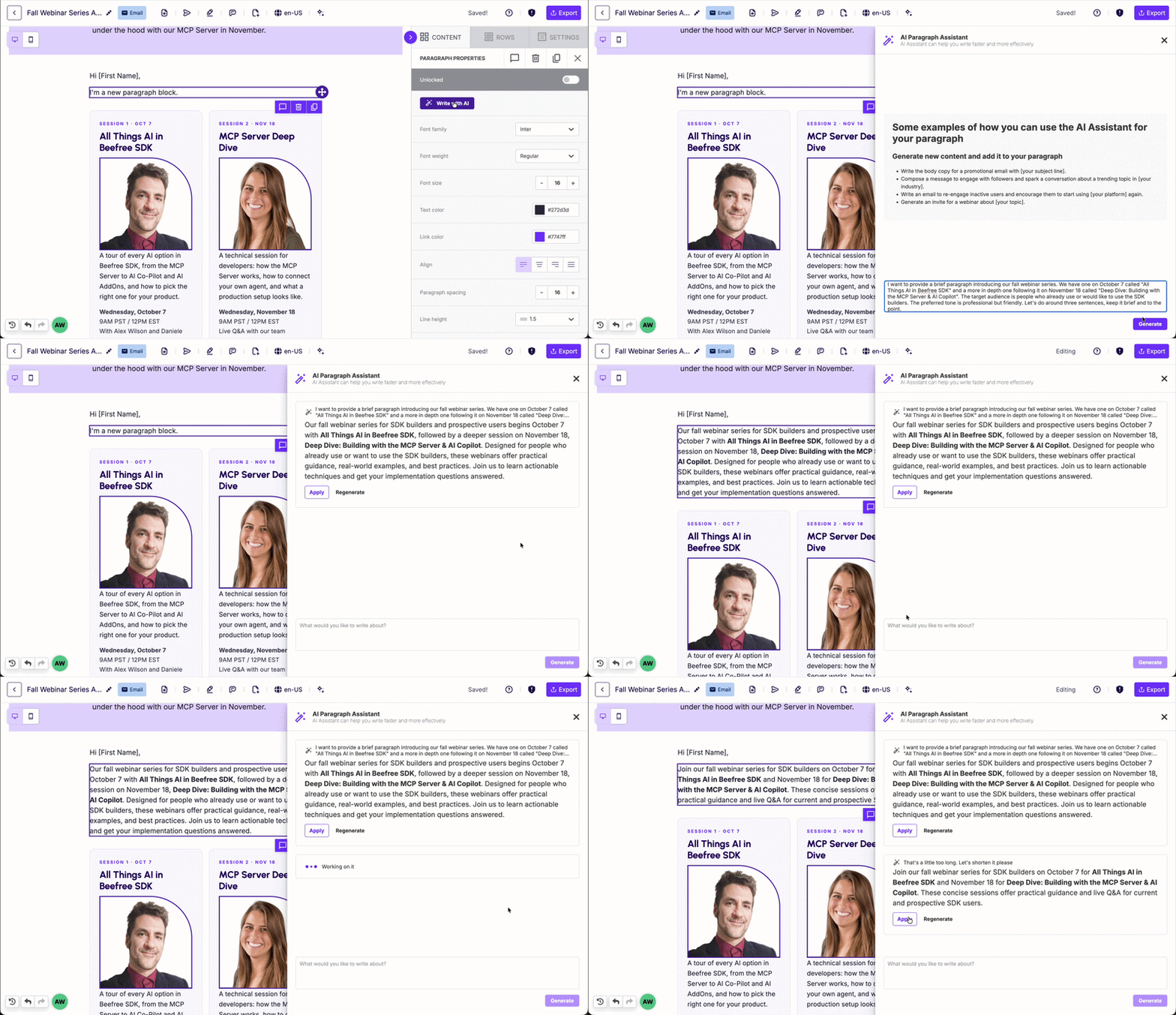
- AI Writing Assistant drafts or rewrites copy in title, paragraph, list, and button blocks, powered by OpenAI, Azure OpenAI, or Anthropic.
- Custom AI Writing Assistant integrates your custom LLM with Beefree SDK, so you can give users advanced AI writing that's specific to your domain (Enterprise plan only).
- Text-to-image (Stable Diffusion XL) turns a text prompt into an image, so users don't have to leave the builder to find one.
- Generate Alt Text with AI describes images using Azure AI Vision, so accessibility doesn't depend on anyone remembering to write the alt text.
- DeepL (AI-powered translation) translates content automagically across multi-language templates, so one design can reach every market your users serve without needing to translate each design manually.
Try this first: Turn on the AI Writing Assistant (and AI alt text) for a handful of power users and see which blocks they use it in. You'll learn more about where AI belongs in your product than you would from any roadmap meeting.
Grow from one pathway to the next
All three pathways run on the same builder, so each step builds on the last instead of replacing it. You can start anywhere on the spectrum, but plenty of teams start small and work their way up, and it might look something like this:
- Learn where AI helps. Switch on the AI Writing Assistant and alt text generation, and learn where your users actually want help. Extra points if you ask them what they find most useful.
- Expand what users can create. Open the AI Co-Pilot to users who are ready to go from prompt to finished design, while the AddOns keep working alongside it.
- Make it yours. Connect your own agent through the MCP Server, so the AI in your product knows your users' data and workflows the way nothing off-the-shelf can.
You can start at any step and move at whatever pace suits your team and your users. They keep the same builder throughout, and we'll keep shipping new AI capabilities on that same foundation, so the work you do today carries forward.
Not sure where to start?
You don't need a perfect AI plan to get going, because picking one pathway and watching how your users respond will teach you more than any strategy deck. You've already got the foundation in place, so your next step can be as small as one toggle or as big as your own agent.
- Watch All Things AI in Beefree SDK on demand: All three pathways demoed in one session
- Ready to build? Getting started with AI in Beefree SDK: Setup docs for all three pathways in one place
Want to go deeper? Join us November 18 at 12pm EST for Deep Dive: Building with the MCP Server & AI Co-Pilot, with in-editor and headless workflows you can build today. Save your seat >
Still not sure which pathway fits your product? Your CSM can help you figure it out, or you can get 1:1 guidance from a real person on our team.
Frequently asked questions
How do I enable AI in Beefree SDK?
You enable AI AddOns and AI Co-Pilot from the Developer Console without changing your integration code, while the MCP Server needs an MCP-compatible Content Services API key and your own agent.
Which Beefree SDK plans include AI?
The MCP Server and AI Co-Pilot (open beta) are available on all paid plans, and AI AddOns, including the AI Writing Assistant, are available on Superpowers and Enterprise plans.
Do I need to change my existing Beefree SDK integration to add AI?
No. AI AddOns and the AI Co-Pilot install from the Developer Console, and the MCP Server works alongside your existing editor sessions or in headless mode.
What's the difference between the AI Co-Pilot and the MCP Server?
The AI Co-Pilot is a ready-made experience we built on the MCP Server, so your users get prompt-to-design without your team building an agent. The MCP Server is what you build on, letting you connect your own agent with full control over its prompts, logic, and workflows.
Can I use my own LLM with Beefree SDK?
Yes. The MCP Server works with any MCP-compatible agent. Co-Pilot supports Anthropic, OpenAI, and Gemini. The Custom AI Writing Assistant AddOn, available on Enterprise, connects your own LLM to the "Write with AI" experience.
Does Beefree SDK charge extra for AI?
There's no separate fee for MCP Server access, since MCP calls count toward your Content Services API allotment, so you're only responsible for your agent's token consumption. For AI AddOns and Co-Pilot, you bring your own provider key and pay your AI provider directly for usage.
How can I reduce token consumption?
Try Code Mode (open beta) with the MCP Server. Instead of exposing 33 individual tools and sending their definitions on every turn, it gives your agent a single tool that accepts a TypeScript script, so it can run several operations in one round trip. In our internal benchmarks, Code Mode cut total token consumption by 68–96%, with most results landing between 85% and 95%. The AI Co-Pilot already runs on Code Mode, so you get those savings there automatically.
How can I ensure AI-generated designs are on-brand for my users?
With Brand Rules, you can set design guardrails the AI must follow, so its output is on-brand from the first pass. Define what elements should look like, what the AI can and can't touch, or how much content fits into a design. Brand Rules work with both the MCP Server and the AI Co-Pilot, so no matter how you're bringing agentic design into your app, you can keep the AI from going off-brand.

.png)

.png)
.png)